This repository is a customized live object-finding runtime built on top of the original Streaming Grounded SAM 2 repo:
- Original repo: https://github.com/patrick-tssn/Streaming-Grounded-SAM-2
The current live pipeline combines:
- OpenAI GPT-based query extraction
- Grounding DINO for text-conditioned detection
- SAM 2 for mask initialization and tracking
- Depth Anything V2 Metric for distance estimation
- Optional audio query input with OpenAI speech-to-text
The main entrypoint is run_live.py.

High-level architecture for the current live perception pipeline.
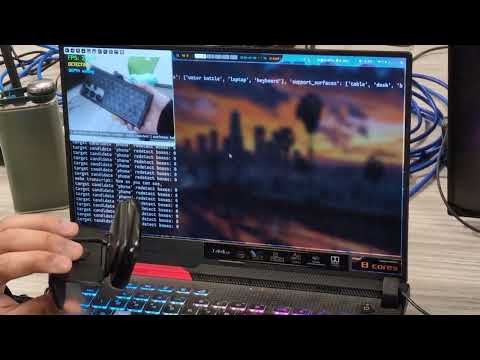

Demo video: https://www.youtube.com/watch?v=kxXIVC9BiPU
The runtime is split into a few concrete layers:
-
Query input layer
- Text mode uses a one-shot static query.
- Audio mode listens for a wake phrase, records a spoken command, and transcribes it with OpenAI speech-to-text.
- Code: live_io/query_input.py, live_io/audio_input.py
-
Frame input layer
- Webcam mode reads directly from a local camera.
- Server mode polls the latest JPEG frame from the FastAPI stream endpoint.
- Code: live_io/frame_source.py, rtc_client_server/server.py
-
Query understanding layer
- The GPT model rewrites the user request into structured target, anchor, and support-surface phrases.
- The runtime can override anchors with a fixed configured list.
- Code: llm/openie.txt, live/query_pipeline.py
-
Detection and tracking layer
- Grounding DINO performs text-conditioned detection.
- SAM 2 initializes masks from detection boxes and then tracks over time.
- Code: live/tracking_pipeline.py, live_runtime.py
-
Depth and scene reasoning layer
- Depth Anything V2 Metric estimates full-frame depth.
- The runtime reads depth only inside tracked masks and computes scene relations.
- Code: live/depth_pipeline.py, live/scene_pipeline.py
-
Memory and output layer
- Recent target observations are stored in scene memory.
- The OpenCV overlay displays tracking state, depth, relations, and memory fallback messages.
- Code: live/memory_pipeline.py, scene_memory.py, live/overlay_renderer.py
The live path in run_live.py works like this:
-
Input enters as either:
- a text query from
--query, or - an audio command captured after the wake phrase
hello
- a text query from
-
The query is queued and sent to the LLM extraction step.
- The extraction produces:
targetsanchorssupport_surfaces
- The extraction produces:
-
Anchor selection is resolved.
- Default: fixed anchors
- Optional: LLM-derived anchors
-
Grounding DINO runs on the current frame for the active target phrase.
- This produces candidate boxes for target initialization or re-detection.
-
SAM 2 loads the frame and initializes tracked objects from those boxes.
- After initialization, SAM 2 handles intermediate tracking updates between re-detections.
-
Depth Anything V2 Metric runs on the full frame in a background worker.
- The runtime samples depth values only inside the tracked SAM masks.
- Median object depth is used for the distance overlay and scene reasoning.
-
Context detections can run in parallel.
- Anchor detections
- Support-surface detections
- Optional hand detections
-
Scene reasoning and memory update from the tracked target state.
- Spatial relations are computed from target, anchors, supports, and hand context.
- Stable target observations can be written into scene memory.
-
The UI overlay renders the current state.
- query summary
- tracking labels
- depth estimates
- spatial relations
- memory fallback text when tracking is lost
In short:
query/audio -> LLM extraction -> Grounding DINO boxes -> SAM 2 tracking -> Depth Anything masked distance -> scene reasoning + memory -> overlay
Create an environment and install:
conda create -n sam2 python=3.10 -y
conda activate sam2
pip install -e .
If you use GPT models, set your API key in llm/.env:
API_KEY="..."
API_BASE=""
API_BASE is optional and only needed for Azure-style routing in the existing wrapper.
Download the required checkpoints:
cd checkpoints
./download_ckpts.sh
cd gdino_checkpoints
hf download IDEA-Research/grounding-dino-tiny --local-dir grounding-dino-tinycd depth_anything_checkpoints
./download_metric_indoor_ckpts.shThis is the simplest local run:
python run_live.py --model gpt-4o-2024-05-13Pass an explicit text query:
python run_live.py --model gpt-4o-2024-05-13 --query "I am trying to find my phone"Use a different camera:
python run_live.py --model gpt-4o-2024-05-13 --camera-index 1Audio query mode listens for the wake phrase hello, then records the spoken command and transcribes it with gpt-4o-transcribe.
python run_live.py --model gpt-4o-2024-05-13 --query-input audioIf your microphone is not the default input device:
python run_live.py --model gpt-4o-2024-05-13 --query-input audio --audio-input-device-index 1If you want to override the wake phrase:
python run_live.py --model gpt-4o-2024-05-13 --query-input audio --wake-phrase "hello"The live runner can also read frames from the local FastAPI server endpoint instead of a directly attached webcam.
Start the server:
python rtc_client_server/server.pyThen run the live pipeline against the server stream:
python run_live.py --model gpt-4o-2024-05-13 --frame-source server --stream-url http://127.0.0.1:5000/stream/latest-frameIf you also want audio query input while using server frames:
python run_live.py --model gpt-4o-2024-05-13 --frame-source server --stream-url http://127.0.0.1:5000/stream/latest-frame --query-input audioIf you are using the included WebRTC client stream path, the client entrypoint is:
python rtc_client_server/client.pyThat client currently has its server_url set directly inside rtc_client_server/client.py, so update it there if needed.
Default mode:
python run_live.py --model gpt-4o-2024-05-13Enabled with:
python run_live.py --model gpt-4o-2024-05-13 --query-input audioUseful audio flags:
--wake-phrase hello
--transcription-model gpt-4o-transcribe
--audio-input-device-index 1
--audio-silence-threshold 550
--min-silence-duration-s 1.0Anchors can come from either:
- a fixed configured list
- the LLM extraction output
This is the default behavior.
Current fixed anchor list:
water bottlerubber duckmarkerusbtowelsnack
Run with default fixed anchors:
python run_live.py --model gpt-4o-2024-05-13Run with an explicit custom fixed anchor list:
python run_live.py --model gpt-4o-2024-05-13 --anchor-source fixed --fixed-anchors "water bottle,rubber duck,marker,usb,towel,snack"Switch to anchors from the LLM extraction:
python run_live.py --model gpt-4o-2024-05-13 --anchor-source llmDisable depth:
python run_live.py --model gpt-4o-2024-05-13 --disable-depthUse the server frame source:
python run_live.py --model gpt-4o-2024-05-13 --frame-source serverLower target detection thresholds are now the defaults:
--target-box-threshold 0.30--target-text-threshold 0.25
- The audio wake detection in this version is transcription-based, not a local keyword spotter.
- In audio mode, say
hello, then briefly pause, then say the command. - The live pipeline entrypoint is run_live.py.
- The stream server entrypoint is rtc_client_server/server.py.
If you use this repository, cite the upstream projects and papers it builds on.
- Patrick Tseng-Sheng Tsai, Streaming Grounded SAM 2: https://github.com/patrick-tssn/Streaming-Grounded-SAM-2
- Ravi, N., Gabeur, V., Hu, Y.-T., et al. "SAM 2: Segment Anything in Images and Videos." https://arxiv.org/abs/2408.00714
- Liu, S., Zeng, Z., Ren, T., et al. "Grounding DINO: Marrying DINO with Grounded Pre-Training for Open-Set Object Detection." https://arxiv.org/abs/2303.05499
- Yang, L., Kang, B., Huang, Z., et al. "Depth Anything V2." https://arxiv.org/abs/2406.09414
- Official SAM 2 repository: https://github.com/facebookresearch/sam2
- IDEA Research Grounded-SAM-2 repository: https://github.com/IDEA-Research/Grounded-SAM-2