Turn any CAD assembly into an interactive 3D product showcase. 399 components. 40+ analysis tools. AI-powered.





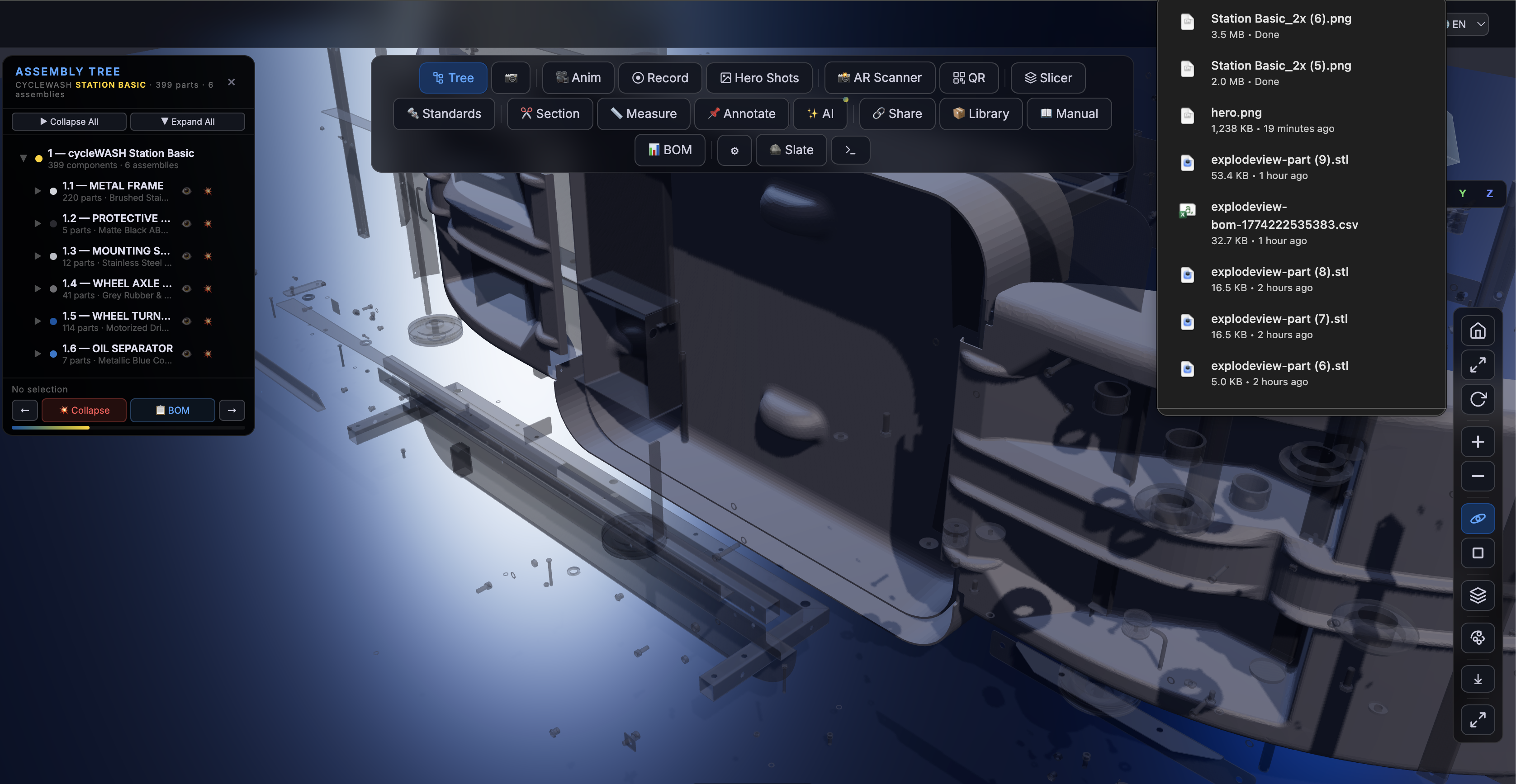
ExplodeView is a browser-based 3D viewer for STEP, STL, and other CAD files. Embed it on your product page, use it as a service tech tool, or integrate it into your manufacturing platform. Built with Three.js r170, AI-powered part identification, and manufacturing-grade tools.
- 399-component assemblies rendered in WebGL with exploded-view animations
- 40+ analysis tools — measurement, QR codes, BOM export, section cuts, part identification
- AI-powered — Gemini Vision API, Groq Llama 3.1 8B, offline NLP fallback
- McMaster-Carr integration — auto-search fasteners with torque specs
- 6 languages — English, German, French, Spanish, Italian, Dutch
- Docker-ready — 3-service stack with STEP converter backend
- 100+ automated tests — visual test agent with live Chrome visualization
- Zero dependencies — everything runs in the browser (or Docker)
https://explodeview.com/demo
npm install explodeview<div id="viewer" style="width:100%; height:600px"></div>
<script src="https://unpkg.com/explodeview@1.0.16/dist/explodeview.js"></script>
<script>
new ExplodeView({
container: '#viewer',
modelUrl: '/your-assembly.step',
theme: 'dark'
});
</script>docker-compose up
# ExplodeView: http://localhost:8080
# STEP Converter: http://localhost:8787
# cycleCAD (sister app): http://localhost:3000npm install explodeview<script src="https://unpkg.com/explodeview"></script>Download dist/explodeview.js and serve it from your own server.
The CLI tool converts STEP/STP files into web-ready assets:
python3 bin/explodeview-process.py <input.step> <output_dir> [options]

Options:
  --name        Product display name
  --brand       Brand name
  --tolerance   Mesh quality (default: 0.5, lower = finer)
Requirements: Python 3.8+ with cadquery and OCP packages.
pip install cadquery OCPOutput structure:
output/
├── parts/           # Individual STL meshes per solid
├── manifest.json    # Part metadata (centers, bounding boxes)
├── assemblies.json  # Auto-detected assembly grouping
└── config.json      # Viewer configuration
// Programmatic initialization
const viewer = await STPViewer.init({
  container: '#my-viewer',
  src: '/path/to/processed/assets/',
  brand: 'Your Brand',
  productName: 'Product Name',
  assemblies: [],  // auto-loaded from assemblies.json
  captions: {
    brand: 'Your Brand',
    productName: 'Product Name',
    loaderTitle: 'Loading...',
    loaderText: 'Preparing 3D model...',
    btnOverview: 'Overview',
    btnCollapse: 'Collapse',
    btnExplode: 'Explode',
  }
});Override auto-detected assemblies with your own grouping:
STPViewer.init({
  container: '#viewer',
  src: '/assets/',
  assemblies: [
    {
      key: 'frame',
      name: 'MAIN FRAME',
      subtitle: 'Structural Steel',
      detail: 'Load-bearing frame assembly.',
      color: '#0055A4',
      indices: [0, 150],  // solid index range
    },
    {
      key: 'motor',
      name: 'DRIVE UNIT',
      subtitle: 'Electric Motor Assembly',
      color: '#FFD100',
      indices: [150, 200],
    }
  ]
});Each assembly can have custom material properties in the assemblies JSON:
{
  "key": "covers",
  "name": "PROTECTIVE COVERS",
  "color": "#2A2A30",
  "material": {
    "metalness": 0.0,
    "roughness": 0.85
  }
}- ✅ 3D exploded-view with timeline scrubber
- ✅ Assembly tree with part highlighting
- ✅ 399-component assemblies (real-world tested)
- ✅ Collapse/expand animations
- ✅ OrbitControls (rotate, pan, zoom)
- ✅ 6 preset views (front, back, top, bottom, left, right)
- ✅ Wireframe + grid + shadow rendering
- ✅ Fit-to-selection (double-click zoom)
- ✅ Realistic 150+ PBR materials
- ✅ Measurement — 2-point distance, 3-point angle
- ✅ QR codes — per-part deep links
- ✅ Bill of Materials — CSV export with quantities
- ✅ Part identification — AI + geometry fallback
- ✅ Section cuts — X/Y/Z cross-sections
- ✅ STL export — individual parts or assembly
- ✅ Annotation pins — drag & drop comments
- ✅ DIN/ISO lookup — standard parts with McMaster-Carr links
- ✅ Assembly instructions — step-by-step HTML export
- ✅ Weight estimator — 15 materials, volume-based
- ✅ Part comparison — select 2 parts, compare dimensions
- ✅ Maintenance heatmap — color-code by urgency
- ✅ Wear timeline — 5-year replacement schedule
- ✅ Clearance checker — detect interference
- ✅ Assembly validator — score A-F
- ✅ Thermal heatmap — simulated heat distribution
- ✅ Vibration analysis — animated vibration
- ✅ Fastener wizard — 12 fastener patterns, torque specs
- ✅ AI Vision Part Identifier — Gemini Vision API
- ✅ Batch AI Scan — auto-scan all parts
- ✅ Smart BOM — AI-identified parts with pricing
- ✅ AI Assembly Instructions — auto-generated service manuals
- ✅ Chatbot — Gemini Flash + Groq Llama 3.1 + offline fallback
- ✅ Design Review — manufacturability analysis
- ✅ STL export (ASCII + binary)
- ✅ OBJ, glTF 2.0, PLY export
- ✅ PNG screenshot (2x retina)
- ✅ GIF export (animated interactions)
- ✅ Service report (technician workflows)
- ✅ Technical report (full HTML)
- ✅ Embed code generator
- ✅ Shareable links
- ✅ Dark & light themes
- ✅ Blueprint theme (white bg + blue wireframe)
- ✅ 6 languages (EN, DE, FR, ES, IT, NL)
- ✅ Custom color schemes
- ✅ Material selector (8 PBR materials)
- ✅ Transparency control (per-part opacity)
- ✅ Color-by-type (auto-coding)
- ✅ Hero shots (pre-configured camera positions)
- ✅ npm package (
npm install explodeview) - ✅ CDN embed (
<script>tag) - ✅ Docker support (3-service stack)
- ✅ Server-side STEP converter (FastAPI)
- ✅ Agent API (programmatic control)
- ✅ WebWorker support (non-blocking parsing)
- ✅ Service Worker (offline mode)
- ✅ COOP/COEP headers (SharedArrayBuffer)
- ✅ 100+ automated tests (visual test agent)
- ✅ Performance monitor (FPS, memory, part count)
- Manufacturing companies — showcase products on your website
- E-commerce — interactive product pages that convert
- Engineering docs — maintenance and assembly manuals
- Sales teams — impressive presentations and proposals
- Education — teach mechanical engineering concepts
<div id="viewer"
     data-stp-viewer="/assets/"
     data-brand="cycleWASH"
     data-product-name="Station Basic"
     style="width:100vw; height:100vh">
</div>
<script src="https://unpkg.com/explodeview"></script><div class="product-3d"
data-stp-viewer="/assets/my-machine/"
data-brand="ACME Corp"
data-product-name="Widget Pro 3000"
style="width:100%; height:500px; border-radius:12px; overflow:hidden">
</div>
<script src="https://unpkg.com/explodeview"></script>Chrome 90+, Firefox 90+, Safari 15+, Edge 90+
PRs welcome! See CONTRIBUTING.md.
MIT — free for personal and commercial use.
Built by Sachin Kumar — creator of cycleWASH, the world's first automated bicycle washing station.